
TCP vs UDP Which Protocol Is Better for Network Performance
Every internet connection relies on specific rules to move data. In the choice between TCP vs UDP, TCP guarantees reliable delivery, while UDP prioritizes maximum speed. Join Axclusive in the article below as we break down their key differences and help you choose the right protocol for your network
Understanding TCP vs UDP Differences
Network architects select protocols based on the specific needs of an application. The Transmission Control Protocol and the User Datagram Protocol differ in how they manage the movement of data. One prioritizes accuracy while the other prioritizes speed. This choice determines the performance of every digital service you use.
Connection Setup
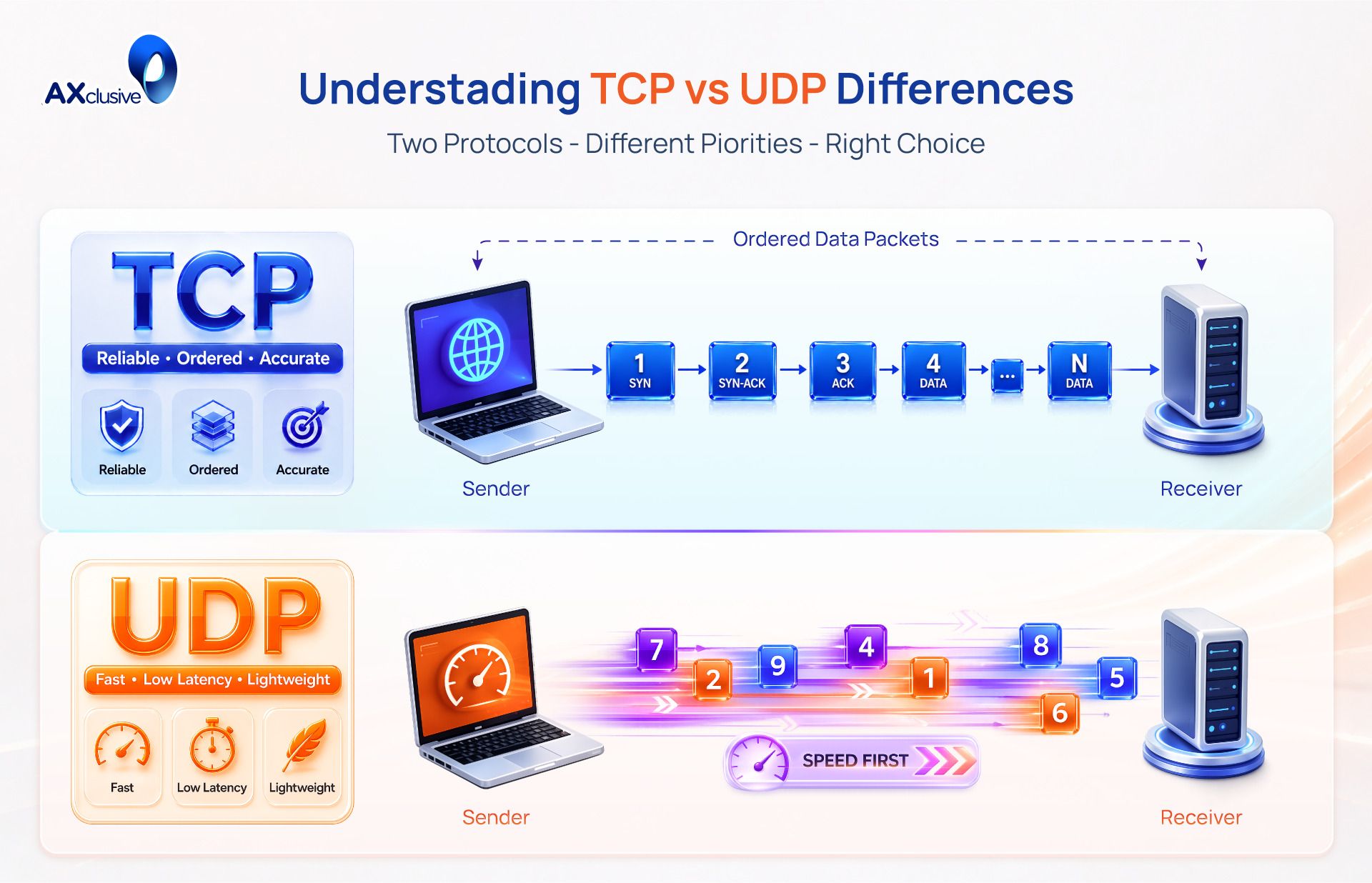
TCP requires a formal link before it transmits any data. It uses a three way handshake to establish this connection. The sender sends a synchronize request. The receiver responds with an acknowledgment. Finally the sender confirms the link. This process ensures both devices are ready for the exchange.
UDP is connectionless. It does not use a handshake or a formal setup. The sender begins transmitting data immediately to the destination address. It does not verify if the receiver is online or ready to accept the packets. This lack of setup allows UDP to start data flows faster than TCP.
Data Reliability
TCP guarantees that every bit of data arrives intact. It assigns a unique sequence number to every packet. The receiving device uses these numbers to reassemble the data in the original order. If a packet goes missing or arrives with errors TCP automatically requests a retransmission. The protocol will not stop until the delivery is complete and accurate.
UDP provides best effort delivery only. It does not track packets with sequence numbers. It does not check if the receiver actually got the data. If a packet drops during transit it is lost forever. The receiver does not ask for a retransmission. This makes UDP unreliable for file transfers but useful for data that loses value if it arrives late.
Overhead and Weight
TCP is a heavy protocol because of the many tasks it performs. Every TCP packet includes a header of at least 20 bytes. This header carries complex control information like sequence numbers and acknowledgment fields. These features consume more processing power and network bandwidth.
UDP is lightweight and efficient. Its header is fixed at only 8 bytes. It contains only four simple fields including source port and destination port. This minimal overhead reduces the amount of extra data sent over the wire. Small headers allow devices to process packets faster which is critical for high frequency communications.
Transfer Speed
TCP is slower due to the constant verification of data. The protocol must wait for the receiver to acknowledge packets before it sends more data. This round trip time adds latency to the transmission. If the network experiences congestion TCP slows down the speed further to prevent errors.
UDP is significantly faster because it never waits for confirmations. It pushes data packets out as fast as the network allows. There is no error recovery logic to pause the stream. This raw speed makes UDP the standard choice for time sensitive applications like live broadcasts where a slight audio skip is better than a long delay.
Flow-control
TCP manages the speed of the sender to protect the receiver. It uses a sliding window mechanism. The receiver tells the sender how much data it can handle at once. This prevents a fast server from crashing a slow computer. TCP also monitors network health and reduces its speed if it detects a traffic jam.
UDP lacks any flow control mechanisms. It sends data at a constant rate regardless of the receiver's condition or network congestion. If the receiver cannot keep up it simply drops the excess packets. This can lead to significant data loss if the network path becomes saturated.
TCP vs UDP Common Ground
While TCP and UDP serve entirely different performance goals, they share fundamental characteristics as the core protocols of modern networking. Understanding their similarities is just as important as knowing their differences. Both protocols provide the essential link between applications and the physical network.
- Transport Layer Operation: Both TCP and UDP function exclusively at Layer 4 (the Transport Layer) of the OSI model. Their primary job is to take data from an application (like a web browser or a game) and prepare it for transmission across the network.
- Reliance on Internet Protocol (IP): Neither protocol can route data across the internet on its own. They both depend entirely on the Internet Protocol (IP) at Layer 3 to handle the actual addressing and delivery of packets from the source IP to the destination IP. This is why you frequently see them written as TCP/IP or UDP/IP.
- Use of Port Numbers (Multiplexing): Both protocols use port numbers to direct traffic to the correct application on a device. Because they support multiplexing, your computer can simultaneously receive an email (via TCP port 25) and stream a video (via UDP port 5004) over the exact same internet connection without the data mixing up.
- Packetization: Neither protocol sends a large file as a single, solid block of data. Both TCP and UDP break data down into smaller, manageable units (called segments for TCP and datagrams for UDP) before handing them off to the IP layer for transmission.
- Vulnerability to Network Conditions: While TCP actively tries to manage network congestion and UDP ignores it, both are physically affected by it. If a network link is overwhelmed, both TCP segments and UDP datagrams will be delayed or dropped by the routing hardware.
TCP vs UDP FAQs
Which is better TCP or UDP?
Neither protocol is inherently better; they serve different purposes. TCP is better when data accuracy is critical (like sending an email or downloading a file) because it guarantees delivery. UDP is better when speed is the priority (like live video streaming or online gaming) because it skips error-checking to transmit data faster.
Is 80 and 443 TCP or UDP?
Ports 80 (HTTP) and 443 (HTTPS) are primarily used with TCP. These are the standard ports for web browsing, which requires the reliable, ordered data transfer that TCP provides to ensure web pages load correctly without missing text or broken images.
Are port numbers the same across both protocols?
No, the port number spaces are completely separate. A computer has 65,535 available ports for TCP and 65,535 separate ports for UDP. While some services use the same port number for both protocols (like DNS on port 53), TCP port 80 and UDP port 80 are treated as entirely different communication channels by the operating system.
What is TCP and UDP for dummies?
Think of TCP like sending a certified letter through the mail: the post office tracks it, requires a signature upon delivery, and will resend it if it gets lost. It is safe but slower. Think of UDP like a radio broadcast: the station sends the signal out as fast as possible to anyone listening, but if you miss a few seconds of the song because of static, they won't replay it for you. It is fast but doesn't guarantee you heard everything.
Choosing between TCP and UDP ultimately comes down to prioritizing either absolute data reliability or maximum real-time speed. Understanding how these two protocols operate is essential for building an efficient network architecture. Axclusive provides these technical insights to help you optimize your infrastructure and select the right data delivery method for your specific business needs.
TCP vs UDP affects network speed, reliability, and application performance. Contact us to choose the right connectivity solution with Axclusive ISP.